Smart TV tracking: how ACR works and what you can stop
A smart TV is a networked computer with a screen, and many models carry a feature called Automatic Content Recognition, or ACR. With ACR switched on, the television samples the picture, turns the sample into a fingerprint and matches it against a catalogue of programs, games and advertisements. In the documented cases and tests, that has included pictures arriving over HDMI from a set-top box or streaming device, not only the TV’s own apps. On the televisions researchers tested, turning the setting off stopped the ACR traffic. Turning it off may not delete what was collected earlier, and nothing on the home network can promise that every collection path is closed.
The Vizio case: what regulators said a television collected
In 2017 the US Federal Trade Commission and the State of New Jersey alleged that Vizio had installed software on its smart TVs that collected viewing information from 11 million televisions without the owners’ knowledge or consent.
The complaint said the televisions captured second-by-second information about the video on screen, whether it arrived through cable, broadband, a set-top box, a DVD, an over-the-air broadcast or a streaming device. It also alleged that Vizio appended demographic information and sold the result to third parties, who used it for purposes including targeting advertising to consumers across devices.
Vizio settled, paid US$2.2 million and accepted requirements covering consent, disclosure, deletion and a privacy program (FTC Vizio settlement). Those are allegations about past conduct, resolved by an order; they do not describe any current Vizio television. The case matters because the complaint described recognition reaching past the TV’s built-in apps to whatever the panel displayed.
What ACR does
Think of Shazam, the app that names a song from a few seconds of audio. ACR does a similar job with a few pixels from the picture.
Roku’s US support documentation describes its version, called Smart TV Experience. The television takes a sample of pixels from the screen, creates an encrypted fingerprint and compares it with a catalogue of content, games and advertisements. A match tells the system what is showing, and Roku says the feature can recognise streaming, antenna and connected-device content (Roku support). A match can then be tied to a time, a device, an account or a network address, and the result can feed recommendations, audience measurement or advertising.
That is the mechanism the evidence supports: fingerprinting and matching. None of the sources on this page shows a television uploading a continuous recording of everything on screen. The fields kept, and who receives them, depend on the manufacturer, model, region, software version and settings.
HDMI inputs: the screen can still recognise the picture
Plugging a trusted Apple TV, games console or media computer into HDMI does not, by itself, switch off the panel’s own recognition; where the television offers that control, it is a separate setting.
A peer-reviewed 2024 study, presented at the ACM Internet Measurement Conference, audited ACR network traffic on Samsung and LG televisions in the United States and the United Kingdom across live television, streaming apps and HDMI inputs. The researchers reported that ACR worked even when the television was used as a “dumb” external display, and they found differences between the two countries (ACM/UCL study). The study covered two platforms, selected models and specific test configurations, so do not assume that one menu, model or country describes all televisions.
An external box still helps, because it lets you avoid the TV’s own apps, accounts and permissions. The box and the display are two computers with two data paths, and you need to check both.
What the viewing record is worth
The Vizio complaint described one commercial model: recognise the viewing, append household characteristics and sell the result for advertising across devices. The ACCC explains the economics: consumer data is important to advertising-technology providers because it enables ad targeting, a key feature of display advertising (ACCC digital advertising inquiry).
Depending on the system, a record can include:
- the program, channel, game or advertisement recognised
- the date, time and length of the match
- a device, advertising or account identifier
- an IP address and an approximate location
- settings, app use and technical diagnostics
- information attached from another source
The last item changes what the record means. One match says a screen showed something. Repeated matches suggest the household’s routine and interests, and joined to an account, a device graph or a demographic dataset it can support an audience profile across televisions, phones and browsers. The Vizio complaint alleged a version of that chain; it is not proof that any named current manufacturer draws every inference listed here.
What changed in 2026
In February 2026 the Texas Attorney General announced an agreement with Samsung. Samsung must stop collecting or processing covered ACR viewing data from Texas consumers without their express consent, and must put clear disclosures and consent screens in place (the Texas agreement with Samsung).
In May 2026 the same office announced a settlement with LG. LG must obtain informed consent before covered ACR viewing-data collection, show a pop-up disclosure and offer a simple way to opt out (the Texas settlement with LG).
Both agreements concern Texas consumers. Neither is an Australian rule, and neither shows that the same wording, default or software update appears on a set sold in Australia. They do set a useful standard: consent before recognition starts, and a control that is easy to find and reverse.
Roku’s support page, dated June 2026, describes More Ways to Watch as a US-only, opt-in feature, says ACR is not enabled out of the box and gives the path Settings, then Privacy, then Smart TV Experience to change it. The same page says data collected while the setting was on is retained after it is turned off. A switch that stops future collection is not a deletion request.
Is the microphone listening too?
ACR and voice control are different systems. The evidence above concerns the picture; it does not show that smart televisions in general record the room’s audio. Some televisions and remotes have microphones for voice features, but any claim about audio needs documentation or testing for that model.
For your own set, check four things:
- whether the television, remote or a connected speaker has a microphone
- whether it listens on a button press or for a wake word
- where speech is processed
- whether recordings are kept
Switch off a sensor you do not use.
What this means in Australia
The US cases describe a technical and commercial pattern. Australia still has directly relevant guidance.
The Office of the Australian Information Commissioner has warned that Internet of Things devices amplify concerns about secondary uses of personal information, above all when the devices are always on or have surveillance and tracking capabilities. It has called for protective defaults, data minimisation and deletion practices across connected products (OAIC IoT submission).
Neither the OAIC nor the ACCC says every smart television is unlawful. Together they leave you three fair questions for any feature on the set: does it need this data, was the choice explained, and can you use the television without agreeing to unrelated profiling?
What you can do about it
Six steps, in the order I would take them at home. Change one thing at a time and test after each.
Check the viewing-data settings on the television itself
Look in the privacy or general settings for terms such as Automatic Content Recognition, viewing information, content recognition, smart TV experience, interest-based advertising or personalisation. Menu names and paths differ by brand and model, so do not assume a path from another television applies.
The 2024 study found that opting out stopped the observed traffic to ACR servers on the Samsung and LG configurations it tested. That is good evidence that the setting matters, not a guarantee that holds across every firmware update.
Keep optional personalisation separate from the features you need
Decline viewing recognition and targeted advertising if the feature gives you nothing you value, then test live television, HDMI, streaming, casting, the program guide and updates. If a privacy setting breaks something you rely on, decide on purpose whether you want the feature back, and write down what you changed.
Put the television in its own room on the network
The Australian Cyber Security Centre recommends an extra Wi-Fi network for Internet of Things devices (ACSC IoT guidance). At home that means a VLAN or a guest network: a separate room for the television and the other devices you do not fully trust. The firewall is the rules on the doors between that room, the rest of the house and the internet.
With the doors set up this way, the rules can stop a compromised television starting a connection to a laptop, work files or private storage, while a phone on the trusted network can still start a cast to it and the television can still reach the streaming services you allow. Replies to a connection the phone started can come back; the television cannot open a new one the other way.
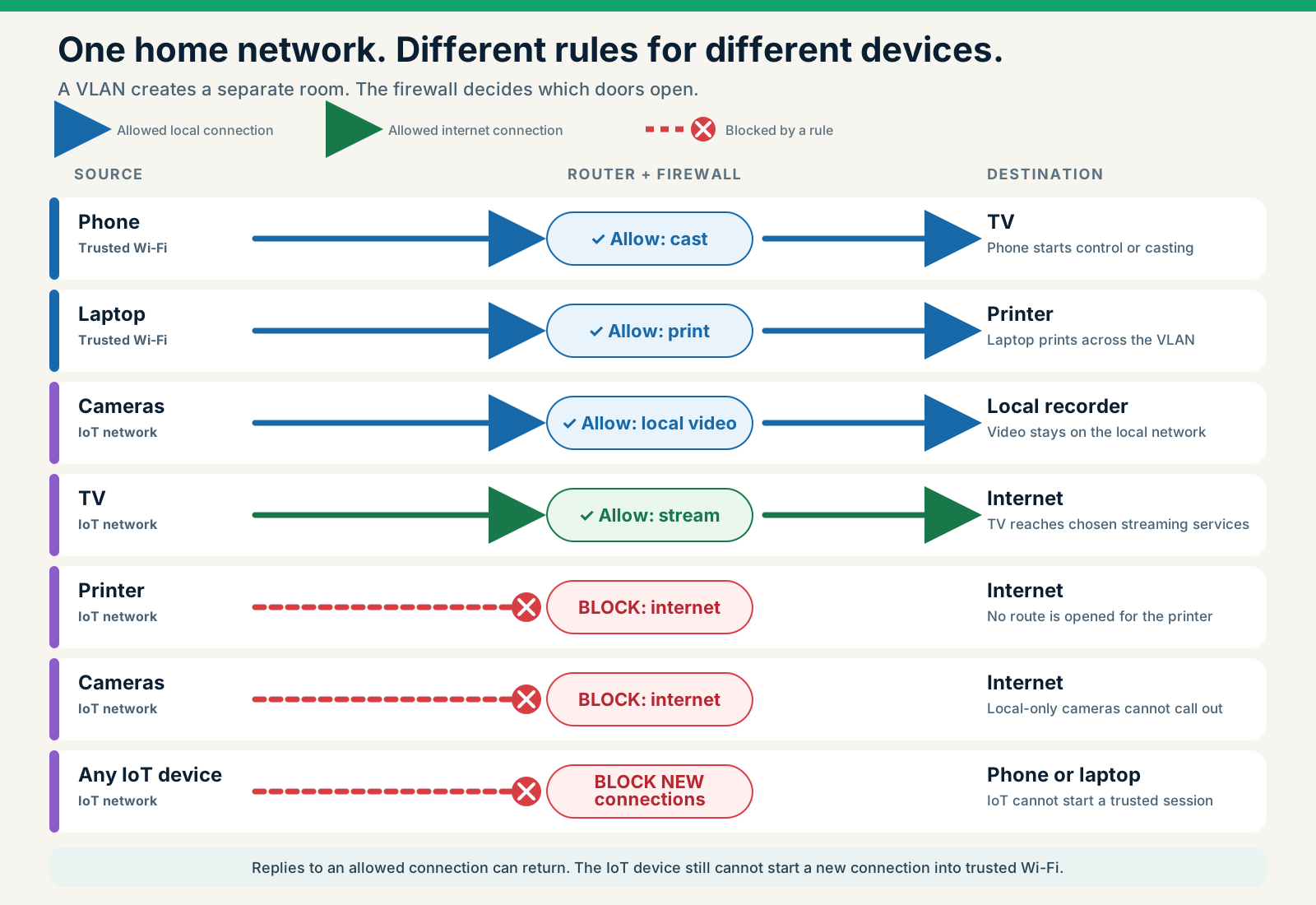
Change the rules and see what happens
Isolation limits where the television can go inside your network; it does not stop the television reaching its vendor while it has internet access. The IoT network guide covers the designs, from a router’s guest network to a dedicated VLAN, and how to keep casting working.
Use DNS filtering as a measured reduction
Pi-hole is an internet address book with a blocklist: when the television asks where a domain lives, it answers for allowed names and refuses listed ones. Pi-hole, AdGuard Home or a supported gateway such as UniFi can block a request when the television uses the DNS path you control and the destination is on a blocklist. A gateway applies that policy alongside the room separation and the door rules, which is why Alien IT recommends a properly configured UniFi gateway where the hardware and maintenance arrangement fit.
DNS filtering cannot read encrypted traffic and does not remove malware from a device. It can miss connections made straight to an IP address, resolvers hard-coded into the television or wrapped in encryption, and analytics served from a domain the television needs for something you want. Blocking a shared vendor endpoint can break sign-in, the program guide, streaming or updates. A quiet DNS log does not prove the device collected nothing, and a busy one does not prove what any payload contained. The Pi-hole guide sets out what DNS blocking can and cannot do for a television; if you would rather not run the filter yourself, the Alien Privacy Box is a maintained local DNS filtering system built on the same idea.
Take the television offline if you only need a display
For a television used only with an antenna or an external box, you may decide it does not need internet access after setup. Test whether you can apply essential firmware updates by hand and whether the features you want still work. The external box has its own accounts, telemetry and privacy controls.
Deal with history separately
Turning off ACR addresses future collection; it may not remove the viewing records already held. Find the vendor’s current privacy request process for your country, note the account and device involved, and keep the response. Before you sell or dispose of the set, sign out, remove linked accounts and run the manufacturer’s documented factory reset.
What these controls cannot promise
A privacy menu does not tell you everything the television collects, and a DNS log does not tell you what a payload contained. Blocklists go stale, firmware changes domains, and the Australian version of a service can behave differently from the one tested overseas.
The aim is to turn off observation you do not need, keep a low-trust device in its own room, cut the avoidable connections and choose the remaining services knowing what they do. The hub page, Own your data, applies the same approach to cars, phones and AI tools.
If you want help applying this at your place, call 02 9707 0999 or use the contact page and tell us which television and router you have.
Frequently asked questions
Does every smart TV use ACR?
No. Features, defaults and names differ by manufacturer, model, region and firmware. Check the documentation and settings on the television you own.
Does ACR upload a video of my screen?
The sources on this page support pixel sampling, fingerprinting and matching. None shows a system uploading a continuous video stream of the screen.
Can ACR recognise a games console or an HDMI streaming box?
In some systems it can. The Vizio complaint covered external sources, Roku documents connected-device content, and the 2024 study observed ACR traffic on tested Samsung and LG televisions used as external displays.
Will turning ACR off delete my viewing history?
Not necessarily. Roku says data collected while its setting was enabled is retained after the setting is turned off. Treat stopping collection and requesting deletion as two separate actions.
Will Pi-hole stop smart TV tracking?
It can block listed domains when the television’s requests go through the resolver it controls. It cannot stop traffic it never sees, cannot separate wanted from unwanted traffic on one domain the television needs, and cannot prove that collection inside the television has stopped.
Is a smart TV microphone always recording?
No source on this page supports that claim for televisions in general. Voice features and microphones differ by model, so check the documentation for yours and test it.
Is an offline television completely private?
Removing network access stops the television sending data over the internet in the ordinary way. It says nothing about data stored on the set or about the boxes, consoles and phones connected to it.