How to put smart TVs and IoT devices on their own network
A smart television does not need the same network access as your work laptop. A robot vacuum does not need a clear path to the family NAS. A visitor’s phone should not be able to open a camera’s administration page. The fix is to give the devices you do not fully trust their own network, with written rules about what they can reach.
That limits the damage if one of them is compromised, or simply has more access than it needs. It does not stop a device sending the data its vendor is permitted to collect. This guide covers three versions of the same idea: a guest network on an ordinary router, an IoT VLAN for a prosumer home, and a segmented network for a small business.
Why this matters
The Australian Cyber Security Centre recommends setting up an additional Wi-Fi network on your router for IoT devices only. It explains that keeping those devices isolated from your sensitive data helps ensure a compromise does not grant access to other devices (ACSC). Australian government network guidance applies the same principle more formally: separate systems by function and strictly limit internet access to the devices that require it (ASD network guidance).
The three tools do different jobs. Segmentation reduces what a device can reach inside your home. DNS filtering, the job Pi-hole does, reduces which destinations it can look up. Local-first automation reduces how many cloud services the house depends on. They work together, but they are not interchangeable.
Choose the simplest design that meets the risk
| Design | Best fit | Effort and relative cost | Main trade-off |
|---|---|---|---|
| Router guest network | Most households and very small offices | Low to medium effort; $ if the router already supports genuine isolation | Simple, but local control and casting may be limited |
| Dedicated IoT VLAN | Keen home users and supported small networks | Medium to high effort; $$ to $$$ | Precise rules, but discovery and firewall policy need care |
| Managed business zones | Offices with cameras, access systems, printers or valuable data | High effort; $$ to $$$ | Better governance and evidence, with ongoing operational work |
Cost bands are relative and exclude Alien IT labour. A second Wi-Fi name on its own proves nothing: the router has to enforce the boundary, and you have to test that it does.
What isolation helps with
- stopping an IoT device from starting connections to trusted laptops, phones and servers
- reducing the chance that a compromised camera, television or appliance can reach other devices
- applying separate DNS, internet and logging rules to smart devices
- containing older products that still need limited use while you plan a replacement
What isolation does not solve
An isolated television can still send viewing data to its vendor if it is allowed onto the internet. A camera can still upload video to its cloud. Segmentation does not fix weak passwords, abandoned firmware, an exposed account, an insecure mobile app, or a device with its own mobile modem that bypasses your network entirely.
A device that meets Australia’s new smart-device security rules is not automatically private either. The mandatory baseline commenced on 4 March 2026 for most in-scope consumer smart devices manufactured from that date (Department of Home Affairs). The rules cover areas including passwords, vulnerability reporting and support periods. They are not a ban on telemetry, profiling or advertising use (Federal Register of Legislation).
Map the household or business before changing it
Before you touch the router, list every connected device. Five columns are enough:
- device, and who owns or uses it
- how it connects: Wi-Fi, Ethernet, a hub or its own mobile network
- what must control it: a phone, Home Assistant, a video recorder or another system
- what it genuinely needs the internet for: updates, remote alerts, streaming or a vendor account
- what it must never reach: work devices, storage, router management or other cameras
Include the easy-to-forget devices: televisions, streaming boxes, speakers, printers, solar inverters, EV chargers, doorbells, hubs, game consoles and networked appliances. Then write down a recovery route for each device before you move it. Note the network it is on now, the setting you are about to change, and how to get it back if it drops off. For locks, alarms, cameras and accessibility equipment this step is not optional.
Option 1: an ordinary-user guest network
This is the right starting point when your router offers real guest isolation. A guest network still gives the device internet access; what changes is what it can reach inside the house.
- Check the router’s current manual. Confirm that guests are blocked from the private network, not merely given a differently named Wi-Fi.
- Create a dedicated IoT Wi-Fi name. Use a strong, unique passphrase and the strongest security mode the router and the devices both support.
- Turn off access to local resources. Use the guest setting that blocks access to computers, storage and the router’s management pages.
- Decide on client isolation deliberately. Client isolation stops devices on the guest network talking to each other. Good containment, but it can break a local hub, casting or phone control that needs two devices to find each other.
- Move one non-critical device first. Test its local controls, streaming, updates and your recovery route before moving anything else.
- Use local DNS where the router supports a narrow exception. IoT devices may need to reach your Pi-hole without gaining access to the rest of the network.
- Keep the trusted Wi-Fi password private. Do not fix every breakage by moving the device back permanently.
Some consumer routers treat guest Wi-Fi as internet-only and block all local discovery. That is often excellent for a television and useless for a speaker you control from your phone. I judge each device on what it actually has to do.
Option 2: an IoT VLAN with controlled access
A VLAN is a separate room for a group of devices. The firewall is the rules on the doors between that room, the trusted room and the internet: who may enter, what may leave and which replies may come back. This is the option for a keen home user, and the router or firewall, the switch and the access points all have to support it end to end. A VLAN setting on one Wi-Fi access point does not necessarily protect the wired paths.
The household starting map, in plain words: Your phone may open a connection to the TV to control it or cast to it. Your laptop may print. The cameras may send video to a local recorder. The TV may reach its streaming services and update servers on the internet. The printer and any local-only cameras are blocked from the internet, because nothing they do needs it. No IoT device may start a connection into the trusted Wi-Fi, but replies to a connection that a trusted device started are allowed back, so your phone’s control session works.
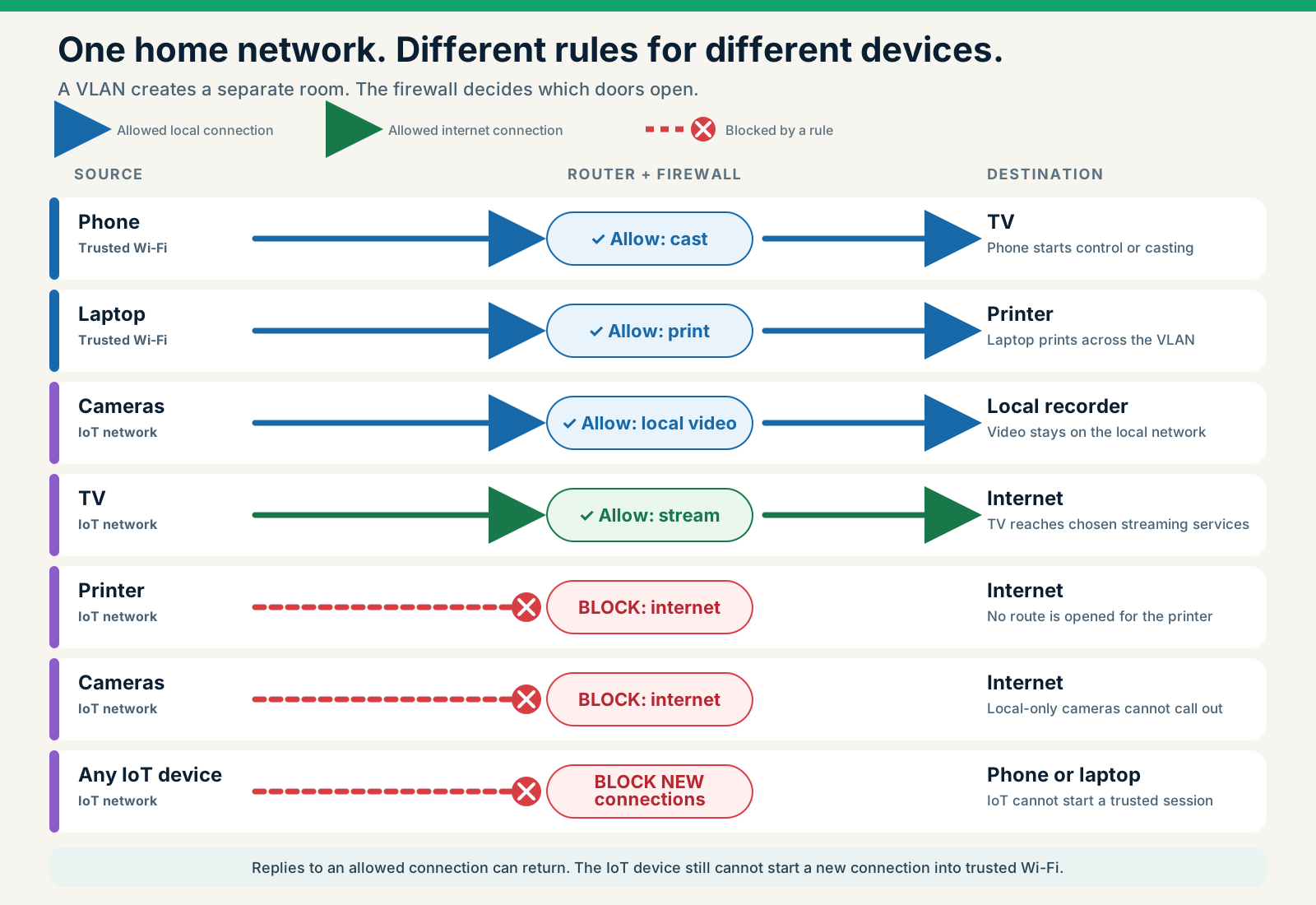
Change the rules and see what happens
The same map as a rule table:
| From | To | Rule |
|---|---|---|
| Phone | TV | Allow the required control or casting connection |
| Laptop | Printer | Allow printing |
| Cameras | Local recorder | Allow local video |
| TV | Internet | Allow required streaming and updates |
| Printer | Internet | Block unless a documented feature requires it |
| Local-only cameras | Internet | Block; cloud-dependent cameras need narrow exceptions or they will not work |
| Any IoT device | Trusted phone or laptop | Block new connections |
| IoT device replying to an approved session | The trusted device that started it | Allow the reply; no other IoT-initiated access |
IoT devices may still need a few small doors of their own: local DNS and time service, and often their vendor’s update servers. Keep the administration pages of the router, switch, access points, storage and any hypervisor unreachable from the IoT room, and make the IPv6 rules match the IPv4 rules.
Start with a deny rule between IoT and trusted systems, then add the smallest exceptions you actually need. Do not add an “IoT to LAN: allow any” rule to make casting work.
Casting and discovery are usually the awkward part. Some devices first announce themselves with a broadcast that normally stays inside one network (multicast discovery), then open a direct connection, and both halves have to cross the boundary. If your gateway offers a discovery relay, limit it to the zones and services that need it, then test both the discovery and the connection that follows.
Controllers are the other exception. Home Assistant usually belongs on a trusted automation zone that is allowed to start connections into the IoT room, not the other way round. Test each integration: cloud control can keep working while local discovery is broken.
Option 3: a small-business segmented network
A business needs more than VLAN numbers. Give every zone an owner and a written purpose, document the firewall rules, and keep only the logs you need to prove and troubleshoot behaviour.
Typical zones separate staff computers, guests, cameras and their recorder, building systems, shared appliances, servers and management interfaces.
Remote vendor support should use named, time-limited access rather than a permanent opening from the internet. Internet-facing services add operational risk and need planned patching and maintenance (UK NCSC). If a vendor says a device needs “full network access”, ask for the exact source, destination and function.
Add DNS policy without overstating it
A VLAN decides what a device can reach. DNS policy decides which names it can look up. Pi-hole is an internet address book with a blocklist: it can refuse listed domains for any device whose DNS requests reach it (Pi-hole documentation). Point the IoT room’s DNS at Pi-hole and, where the firewall supports it, stop the IoT room from using any other conventional DNS server.
A firewall can control conventional external DNS, but it will not catch every encrypted DNS service, VPN, direct-to-IP connection or service that shares a hostname with something you want to keep. Query logs prove what DNS decided, not that nothing else left the house. DNS filtering does not remove malware from a device that already has it. Read what Pi-hole blocks and what it misses before relying on it.
UniFi implementation note
On supported UniFi gateways, VLANs or firewall zones separate IoT from trusted systems, while the gateway’s content filtering, custom domain rules and IPS (an alarm that can also stop matching traffic) add internet controls on top. The order matters. A separate IoT zone limits what a device can reach locally; it does not automatically stop internet telemetry. Apply a deliberate DNS or internet-access rule as a separate layer.
Keep the IoT room’s access to gateway services narrow without accidentally blocking the DNS, DHCP or time service it needs. Test IPv6 as well as IPv4, and write down every casting, Home Assistant or recorder exception. CyberSecure can expand threat intelligence on compatible deployments, but it is optional, per site, and has documented cloud dependencies; the VLAN and firewall rules in this guide do not depend on it. Alien IT recommends a properly configured UniFi gateway where the hardware and the maintenance arrangement fit. The UniFi gateway guide covers the filtering, IPS and rollback design in full.
Failure and recovery tests
Run these checks after setup, and again after any major router, firewall or device update:
- Boundary test. From the IoT network, try to reach a test laptop, the NAS and the router’s administration page. Every attempt should fail.
- Return-traffic test. Start an approved control action from the trusted network and confirm the replies come back, without any unrelated IoT-initiated access working.
- Discovery test. Test casting, printing and local app discovery. Confirm any relay exposes only what you intended.
- Internet test. Confirm required updates and services work. Then block internet access temporarily for one non-critical device and record what still works locally.
- DNS test. Look up a known test domain and confirm the approved DNS service logs the query. Check IPv4 and IPv6 separately.
- Reboot test. Restart the router, an access point and one device during a planned window. Confirm the device rejoins the correct network rather than a remembered trusted Wi-Fi.
- Recovery test. Use your written rollback to restore one device without resetting the whole router.
For cameras, locks, alarms, health or accessibility devices, schedule the tests so a failure does not remove a safety function, and keep an approved manual alternative ready.
Maintenance burden
Review the device list whenever equipment is added or removed. Apply router, access-point and device security updates, re-test the rules after upgrades, and investigate any device that suddenly wants broad access. Retire products that are past their support period when the risk warrants it.
Privacy settings on the devices themselves still matter. The OAIC has warned that always-on IoT amplifies the risks from secondary uses of personal information (OAIC). Network isolation limits reach inside your premises. It does not rewrite a vendor’s data practices.
When Alien IT can help
Alien IT can assess whether a household needs a simple guest network, an IoT VLAN or a broader segmented design, then document the device flows, DNS policy, controlled exceptions and recovery tests.
For a home, see Alien Private Home. For an office with storage, cameras or managed systems, the same design is delivered as Alien Private Business. Suitability and ongoing support depend on your existing equipment and what each device has to do; this guide does not imply that any particular router or device is compatible.
Not sure which of the three designs fits your home or office, or whether your router can isolate devices at all? Call 02 9707 0999 or use the contact page.
Frequently asked questions
Is a guest network the same as a VLAN?
Not necessarily. A guest network is a user-facing feature. It may use a VLAN internally, but the important question is what the router actually blocks. Verify that guests cannot reach private devices before you rely on it.
Will a VLAN stop a smart TV tracking me?
No. A VLAN protects your other local systems and gives you a place to apply stricter rules. If the television can still reach its vendor, the data it is permitted to send can still leave.
Why did casting stop working?
Discovery traffic usually stays within one network. Crossing the boundary may need a narrowly configured discovery relay plus a specific firewall rule for the connection that follows. Do not reopen the whole network as a shortcut.
Should every IoT device be blocked from the internet?
Not automatically. Some products need internet access for updates or for features you actually use. Test one device at a time and write down what breaks. Prefer products that keep working locally when the internet is not available.