What is Pi-hole? What it blocks, what it misses and how to run it
Pi-hole is an internet address book with a blocklist, for your whole home. Your television, phone and apps make internet connections even when no browser is open, and most connections start by asking for an address. Because Pi-hole answers that question, it can show you many of the names your devices try to reach and refuse some of them.
It makes some background activity visible. It does not make the network anonymous, and it does not remove malware from a device that already has it.
Why this matters
Many televisions, apps and appliances have no browser extension and few privacy controls. Pi-hole can cover them without installing software on every device. It also shows which device asked for a name, when, and whether the request was allowed or blocked.
| Decision | Practical answer |
|---|---|
| Main benefit | See and block listed internet names across the home network |
| Difficulty | Low to medium for a basic setup; higher when devices use other DNS services or sit on separate networks |
| Relative cost | Low on reliable hardware you already run; modest for a dedicated maintained appliance or a redundant pair |
| Maintenance | Install updates, review mistaken blocks, maintain lists, protect the history and keep a backup |
| Ordinary-user fit | Good when the router can send devices to Pi-hole and someone knows how to restore DNS if it fails |
What happened on one real home network
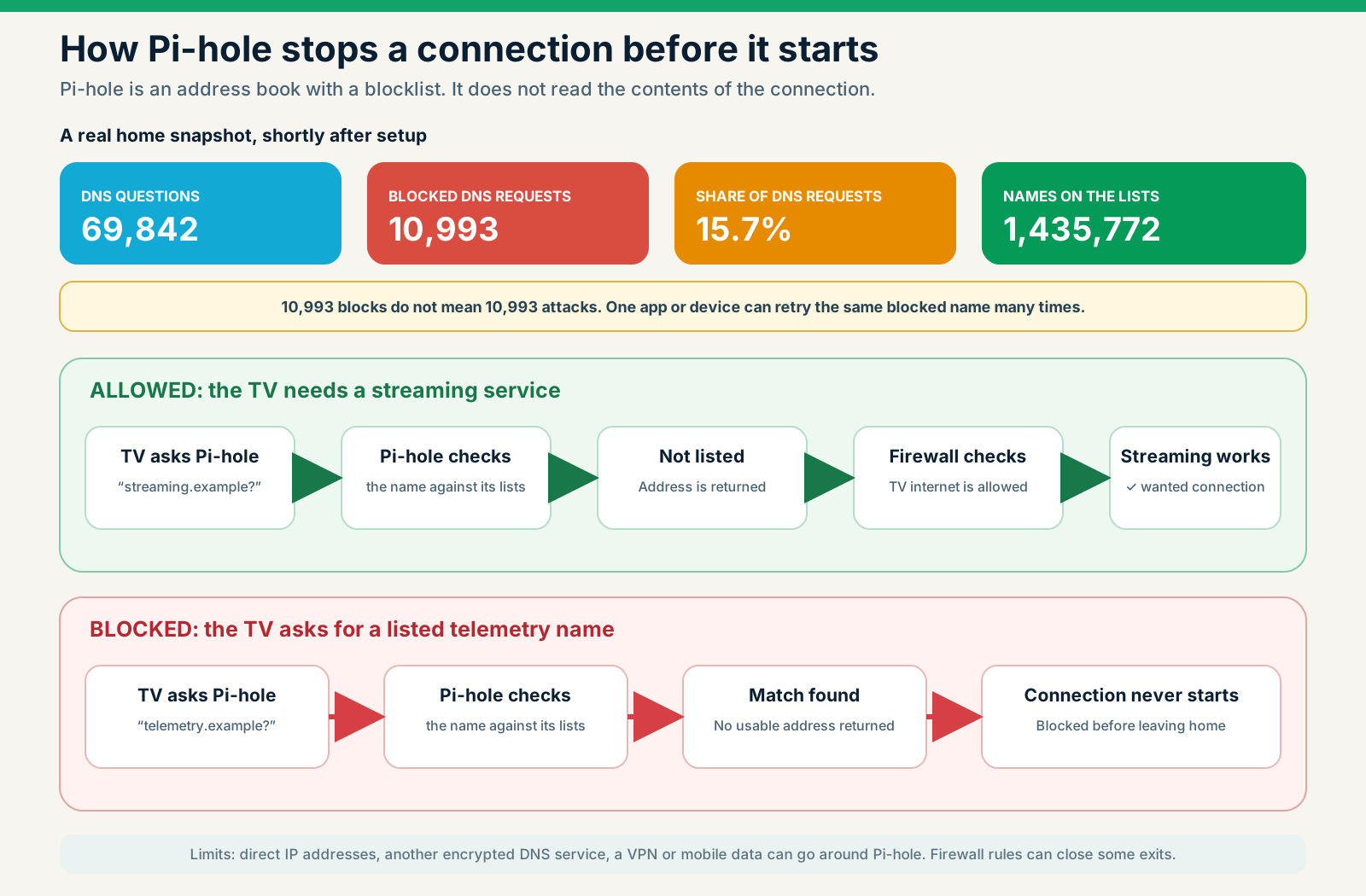
The dashboard at my place, on a newly installed Pi-hole, showed 69,842 DNS queries from seven active devices. Pi-hole blocked 10,993 of them, or 15.7 per cent. The enabled lists held 1,435,772 names at the time.
That does not mean my home stopped 10,993 attacks. These are requests for addresses, not completed connections, and not a verdict on what each request meant. The blocked group can include advertising, tracking, telemetry, a known malicious name, a harmless check, or part of an app blocked by mistake. A blocked name is not proof of malware, and a DNS filter cannot remove malware from a device.
Retries push the number up. If a television asks for the same blocked address every few seconds, every attempt lands in the total. One noisy device can account for thousands of entries without thousands of separate events.
The list count proves even less: it is how many names the enabled lists held when last loaded, not proof that every list downloaded successfully or that those names cover what your devices actually contact.
The useful part is being able to ask:
- Which device made the request?
- Which name did it ask for?
- Does it keep asking while nobody is using it?
- Which list or rule blocked it?
- Did anything useful stop working?
A name that sounds suspicious may still be needed for an update, a login or a safety feature. I check what a name is for before I describe it, and I test one change at a time. This is an early snapshot from one home shortly after setup, not a seven-day study and not a benchmark for every Australian household.
Pi-hole’s query database records allowed, cached, forwarded and blocked results. That is evidence of DNS decisions, not proof of what was inside a connection or why a device made it (Pi-hole query database documentation).
Which list sources are active in this home?
The list screen showed the first ten enabled sources on page 1 of 2. Page 2 was not captured, so this is part of my setup, not a list pack to copy.
| Practical grouping | Visible sources |
|---|---|
| Broad, advertising and tracking | StevenBlack Hosts, AdAway, Peter Lowe, AdGuard DNS and EasyPrivacy |
| Windows telemetry | WindowsSpyBlocker |
| Malware and phishing | RPiList Malware, URLHaus Hostfile and Phishing Army Extended |
| Cryptojacking | Prigent Crypto |
These are overlapping inputs, not ten shields in a row. Pi-hole’s Gravity process downloads the enabled sources, merges them, strips the comments and sorts the names into one unique set (Pi-hole Gravity documentation). StevenBlack’s current unified file already takes in AdAway, URLHaus and yoyo.org, the source of the Peter Lowe list, so some overlap is expected (StevenBlack Hosts). Four of them (AdGuard DNS, EasyPrivacy, RPiList Malware and Prigent Crypto) are the copies hosted by Firebog.
The groupings in the table and the diagram are explanatory, taken from each list’s own description, not a check of every name. Pi-hole’s real decision also depends on which client group a device belongs to and on your own allow and deny entries, which are checked in a set order alongside the lists. A name that matches nothing is simply not blocked; that does not guarantee it will resolve, or that the destination is safe.

More is not always better. Old or broad entries can break logins, updates or streaming. Use maintained sources, and investigate a name before you allow it.
How Pi-hole blocks a request
People remember a name such as example.com; a device needs the matching network address before it can usually connect.
On a Pi-hole network the device asks Pi-hole first, and Pi-hole checks the name against its rules and lists:
- Allowed name: Pi-hole supplies the address, from a saved answer or by asking another DNS service. The device can then try to connect.
- Blocked name: Pi-hole does not supply the real address. The connection usually stops before it starts.
Change the rules and see what happens
This works when the unwanted service uses its own identifiable domain and the device actually asks Pi-hole. The Pi-hole project describes it as network-wide blocking without client software on each device (Pi-hole documentation).
What Pi-hole cannot block
Wanted content and advertising on the same domain
If a video and its advert come from the same hostname, DNS sees one destination; blocking it blocks both. AdGuard Home’s own documentation lists YouTube and Twitch ads and sponsored social-network posts as examples of this DNS-level limit (AdGuard Home).
Browser content blockers can make finer decisions because they see the page and the request.
Traffic that does not use Pi-hole
A device can have an outside DNS service hard-coded in its firmware. An app can use DNS over HTTPS (DoH) or another encrypted resolver. Mozilla says DoH can bypass a local resolver and defeat DNS-based filtering policies (Mozilla).
A firewall (the rules on the doors between your network and the internet) can redirect or block ordinary outside DNS and restrict known encrypted-DNS paths. It cannot promise to recognise every encrypted resolver forever, especially when DNS traffic looks like ordinary HTTPS or travels inside a VPN. Enforcement takes testing and ongoing maintenance.
Direct-IP connections
If software connects straight to an IP address without asking DNS, there is no name lookup for Pi-hole to block. A firewall may control that connection, but IP addresses change and are often shared.
A separate mobile connection
A connected car, a security device or a tablet with its own mobile modem may never touch the home resolver. No setting on a home Pi-hole can filter a path that never enters the home network.
First-party collection
If a service records what you do on its own domain, or inside an account you chose to use, blocking the whole domain may make the service unusable. Pi-hole cannot change the data you deliberately submit, or the server logs needed to run the service.
Data already collected
DNS blocking acts on future requests. It does not retrieve, delete or correct data already held elsewhere. Account deletion, privacy requests and retention policies are separate work.
How the firewall helps devices use Pi-hole
Some devices follow the router’s DNS setting; others try a different DNS service. A firewall can make it harder for them to go around Pi-hole.
Basic: the router tells every device to use Pi-hole. This is enough for many homes and is the easiest arrangement to maintain.
Enforced: firewall rules catch or block common attempts to ask an outside DNS service instead. This needs careful testing, including with IPv6.
Tightly controlled: a managed firewall also limits known encrypted DNS services, VPNs or internet destinations. More control, but easier to get wrong: a broad rule can break updates or useful features.
No setting makes bypass impossible. The aim is a clear set of rules that can be tested and repaired.
When the router can do the filtering
A supported UniFi gateway can provide DNS-level content filtering, custom domain rules, IoT zones and IPS (an alarm that can also stop matching traffic) at the network edge. For some homes and small businesses that is the simplest design: no separate DNS appliance to keep available, and the policy sits beside the firewall that enforces it. Where the hardware and maintenance arrangement fit, a properly configured UniFi gateway is the setup Alien IT recommends first. Either way, maintained blocking of known malicious names is an underrated early defence: a device that cannot look up a bad name usually cannot reach it.
That overlap does not make the two identical. Pi-hole is a dedicated DNS policy and visibility system with flexible groups and maintained-list options. UniFi adds separate local networks, internet-access rules and signature inspection, but its official documentation does not establish a Pi-hole-style way to subscribe to arbitrary community lists. A hybrid can work: the gateway forces every device to use Pi-hole, and Pi-hole makes the decisions. Decide deliberately which box answers DNS and where it sends the questions it cannot answer, or the two will fight each other.
The UniFi router security guide compares the two paths, including what IDS, IPS and CyberSecure add.
Pi-hole and Unbound
By default, Pi-hole forwards allowed queries to an upstream resolver. That provider can see the stream it receives under its own policy.
Unbound can do the resolving locally. NLnet Labs describes it as a validating, recursive, caching DNS resolver (Unbound documentation). Instead of asking one public resolver for every answer, it works down the DNS hierarchy itself and caches the results at home.
This changes who holds the record; it does not make you invisible. NLnet Labs notes that parts of your queries still leave the network, potentially unencrypted, during ordinary recursion (home-resolver guide). Authoritative DNS servers and anyone watching the network may still see parts of the process.
Use Pi-hole plus Unbound when local resolver control, caching and DNSSEC validation justify the extra component. Nobody should sell it to you as anonymous DNS. The Pi-hole and Unbound guide covers what changes when you run your own resolver.
Pi-hole and an IoT network
Pi-hole controls name resolution. Network segmentation controls which devices can talk to one another. They solve different problems.
A VLAN is a separate room for a group of devices. Putting a television, speaker or appliance in its own room (a guest network or IoT VLAN) keeps it away from laptops, work systems and storage. The Australian Cyber Security Centre recommends an additional Wi-Fi network for IoT devices and says isolation helps stop a compromised device reaching other data (ACSC). The room alone does not block internet access, though; the firewall rules on its doors decide that.
A practical policy might allow IoT devices to:
- ask only the local DNS resolver
- reach network time and approved update services
- reach the internet where a documented feature needs it
- respond to a Home Assistant controller
- remain unable to start connections to personal computers or the NAS
Casting, discovery and phone control can cross network boundaries only with considered firewall and multicast rules. “Put it on a VLAN” is not a complete design. The IoT network guide works through the rooms and the door rules.
Pi-hole and Home Assistant
Home Assistant can give device activity useful context. A burst of lookups may line up with an automation, a firmware update or a cloud integration. Home Assistant says its core runs on the user’s hardware, stores data locally and talks directly to a device when that device supports local control (Home Assistant).
The qualification is the point: when the device supports it. A Home Assistant dashboard does not turn a cloud-only product into a local one. Review the integration’s IoT class and the device’s behaviour with internet access removed. The local-first smart home guide goes further.
The dashboard contains private information too
A DNS dashboard can reveal interests and routines. Even without page paths, domain names can expose banks, health services, workplaces, or political and religious activity.
Decide:
- how long query history is kept
- who can open the dashboard
- whether client names contain personal information
- whether remote support can see the logs
- whether backups include query history
- whether the logs are needed at all after troubleshooting
How to set it up safely
- Choose a reliable host. Use an always-on supported device with stable storage and power. A Pi-hole outage can look like “the internet is down”.
- Give it a stable address. Set a DHCP reservation or a documented static address.
- Install from the official project instructions. Record the version and avoid install scripts copied from a forum.
- Set the router’s LAN DNS. Check IPv4 and IPv6 behaviour rather than assuming one setting covers both.
- Start with a conservative list. Aggressive lists mean more breakage and more support work.
- Test representative devices. Check browsing, banking, streaming, work login, updates, casting, games and smart-home control.
- Create groups. Apply stricter policies to IoT devices without breaking the clients that matter.
- Secure administration. Use a strong credential, restrict dashboard access and never expose it directly to the public internet.
- Back up the configuration. Document upstream resolvers, DHCP settings, custom rules and the recovery procedure.
- Plan for failure. Know how to restore DNS quickly without silently bypassing the filter forever.
Before calling a domain suspicious
Do not build a “top trackers” list from names alone. Use a small evidence ladder:
- Identify the registered owner and the certificate names.
- Read the vendor’s current privacy notice and support documentation.
- Compare requests with a relevant privacy setting on and off.
- Watch the timing around actions and idle periods.
- Check independent blocklist classifications and the evidence they cite.
- Never claim message content or purpose from DNS alone.
The honest phrase is often “the TV repeatedly requested a domain associated with the vendor’s analytics service”, not “the TV uploaded everything we watched”.
Is an Alien Privacy Box appropriate?
The Alien Privacy Box is our managed version of what this guide describes: a conservative filtering policy, a local dashboard, documented recovery, and optional Unbound or firewall enforcement, on Pi-hole or a supported UniFi gateway. It suits someone who wants network-wide visibility and reduction without maintaining it alone.
It is not the right fit if you expect anonymity, the removal of every ad, control over a device’s own mobile connection, or an appliance that never needs an update.
Before you buy any managed filter, from Alien IT or anyone else, ask for:
- the routers and network layouts it supports
- who maintains the lists and the software
- what remote support can see
- how long logs are kept and what backups contain
- what happens when it fails, and how to bypass it safely
- the review period and ongoing support included
- a plain statement of its limits
If the answers are vague, do not buy yet. The Alien Privacy Box page sets out ours, including what it cannot do.
What this means for the average person
Pi-hole turns some hidden background requests into decisions you control, on devices that otherwise offer little control, and it reveals how much a quiet appliance talks. Its limitation is the same as its strength: it works at the DNS level, so it cannot see every path or judge every purpose.
Privacy is not all or nothing. If Pi-hole stops a television reaching an unnecessary analytics domain, that is one less data flow. It does not need to stop everything to be worthwhile, only to be described honestly, maintained competently and combined with the right controls.
Not sure whether Pi-hole, a UniFi gateway or both fit your home or business? Alien IT can look at your network, set it up and write down plainly what it can and cannot do. Call 02 9707 0999 or use the contact page.
Frequently asked questions
Will Pi-hole block YouTube ads?
Usually it cannot, and never reliably. The adverts and the wanted videos can come from the same domains, and a DNS filter cannot separate them.
Can a smart TV bypass Pi-hole?
Yes, it can. It may use hard-coded DNS, encrypted DNS, direct IP addresses or a separate mobile connection. Test coverage on the actual model and network.
Does Pi-hole slow the internet?
It does not normally slow anything you would notice. A DNS lookup is a small part of loading a service, and caching can make repeat lookups faster. Poor hardware, storage failure, configuration errors or an unavailable resolver can cause noticeable problems.
Does Pi-hole see the pages I visit?
It generally sees domain names, not full encrypted URLs or page contents. Domain history can still be sensitive, so protect it and keep it only as long as needed.
Is Unbound required?
No, it is optional. Pi-hole can use a reputable upstream resolver. Unbound is a custody and validation choice that adds maintenance.
Do I still need a browser content blocker?
Yes, where your devices support one. Browser blockers can make request-level and page-level decisions that DNS cannot.
Is a second Pi-hole necessary?
It is not necessary for every home. Redundancy stops one DNS failure taking the house offline, but it is another system to update and keep consistent. Match the design to the impact of an outage.