UniFi router security: DNS blocking, CyberSecure and IoT control
A properly configured UniFi gateway can refuse connections to listed malicious domains and put smart devices in their own part of the network. It can raise an alarm when traffic matches a known suspicious pattern, and it can decide which devices may reach the internet at all. Where the hardware and the maintenance arrangement fit, this is the first thing Alien IT recommends. It is not a complete defence. It works only on traffic the gateway can see and identify, and it never removes malware from a device.
A typical home router gives the work laptop, the family phones, the smart television, the doorbell, the printer and the robot vacuum the same broad access to one another and to the internet. That matters because malware does not always announce itself. Sometimes it sits quietly on a computer, camera or appliance and asks the internet where to find its next instruction. A simple gateway rule can sometimes stop that conversation before it starts.
Why this matters
Most home and small-business networks let every internal device start connections to almost anywhere on the internet. That is convenient. It also means a compromised camera or an unwanted application gets the same outbound freedom as a trusted laptop.
The router is the shared choke point. One well-designed policy can cover devices with weak settings, abandoned firmware or no way to install security software.
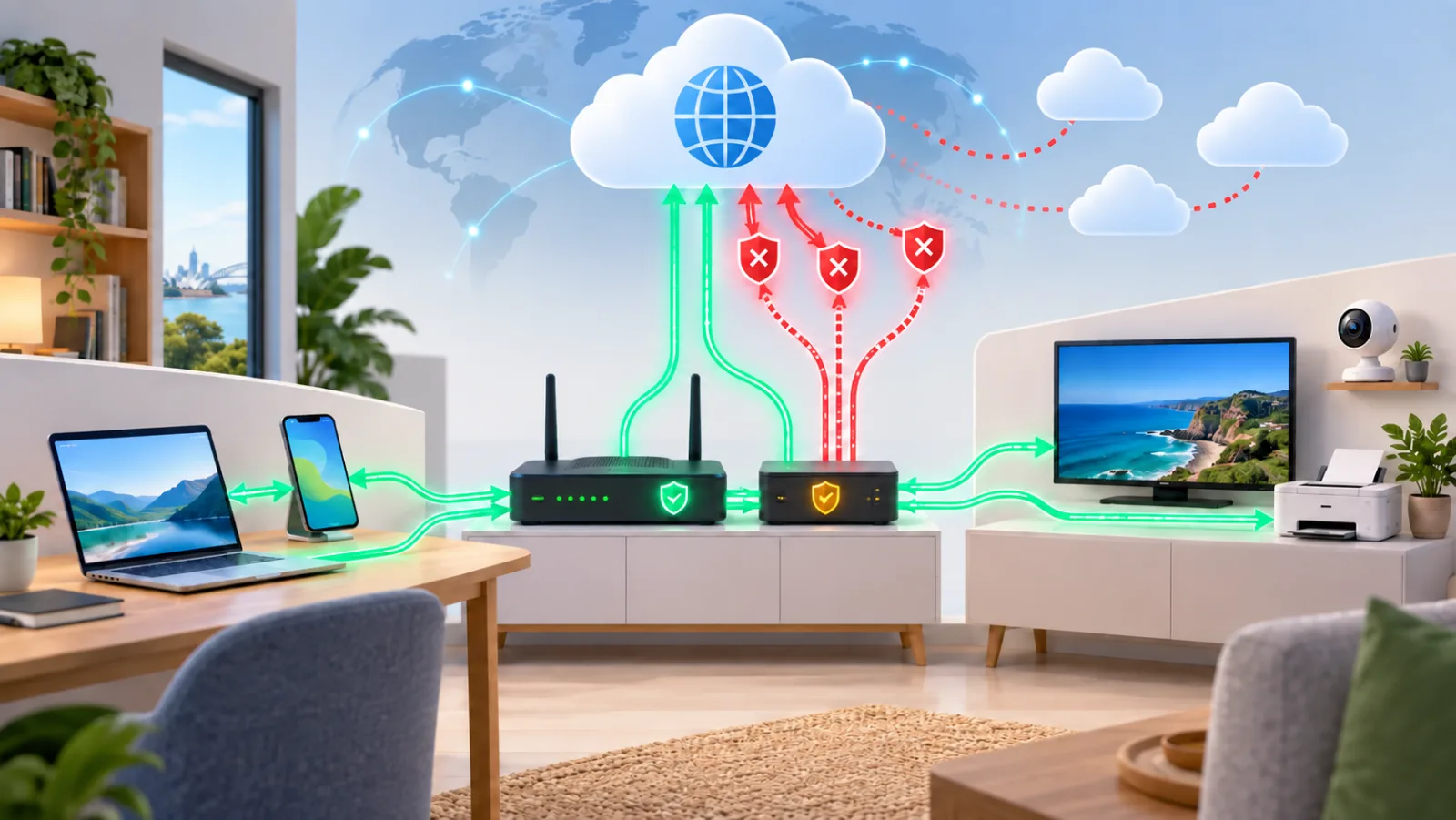
Australian gateway guidance describes protective DNS as a resolver that prevents lookups for known-malicious domains. It says a DNS sinkhole may prevent malware receiving command-and-control instructions, the technical name for malware "phoning home" to collect orders or report status (ASD Gateway Security Guidance Package).
That makes domain filtering valuable before an incident and useful after one. A blocked request can prevent a connection and reveal which device attempted it. It does not remove the malware. The device still needs to be isolated, checked, cleaned or rebuilt.
At a glance
| Question | Practical answer |
|---|---|
| Main benefit | One place for DNS filtering, separate device networks, known-threat blocking and internet-access rules |
| Difficulty | Medium for basic filtering; high when most internet access is blocked by default or services must work across networks |
| Relative cost | $$ to $$$ for suitable gateway hardware; CyberSecure is an optional per-site subscription |
| Maintenance | Gateway updates, block and allow list review, alert investigation, performance checks, backups and repeat testing |
| Ordinary-user fit | Strong when someone owns the policy; a managed setup is better when outages or false positives would be hard to diagnose |
The cost band is relative and does not include labour. Check hardware capability, menu names, throughput and subscription availability against your actual gateway and account before relying on any of it.
Four simple ways to think about the protection
1. The address book: DNS filtering and Pi-hole
DNS is the internet's address book. A device asks for the address that belongs to a name such as example.com. A DNS filter checks that name before answering. If the name is on a blocklist, it refuses to hand over the address, so the connection usually never starts.
Pi-hole is a dedicated local version of that idea: an internet address book with a blocklist and a dashboard. UniFi can do a similar DNS-level filtering job on supported gateways. The two can be combined with care, but the network needs one clearly documented DNS path.
Ubiquiti documents content filtering as a DNS-level feature that can be applied to selected VLANs or individual clients. The gateway compares requests with its internal or enhanced category filters, and you can add your own allowed and blocked domains (Ubiquiti content and domain filtering).
This is the simple, underrated layer. If a television, laptop or infected device asks for a listed destination, the gateway can deny the lookup before the connection begins.
Start with a conservative policy. A longer list is not automatically a safer one. Stale or overbroad entries can block software updates, payments, logins, remote support or an entire service that sits behind a shared domain.
2. The alarm: IDS, IPS and optional CyberSecure
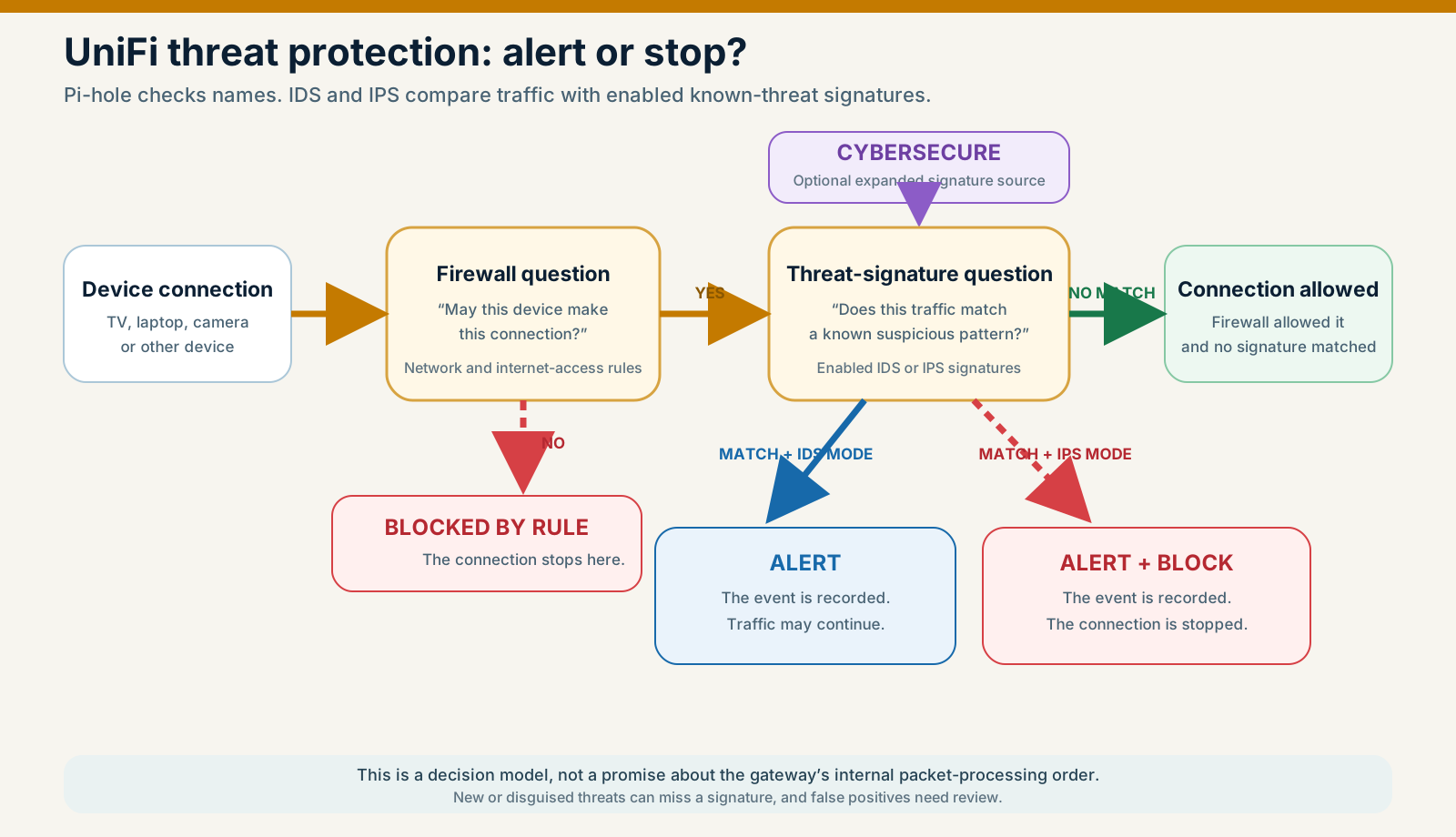
An intrusion detection system, or IDS, is an alarm that reports matching traffic. An intrusion prevention system, or IPS, is an alarm that can also stop matching traffic. Ubiquiti's current setup distinguishes Notify from Notify and Block, and says detections should be investigated because false positives occur (Ubiquiti IDS/IPS documentation).
CyberSecure is optional expanded threat intelligence for supported UniFi gateways. It gives the alarm more known suspicious patterns to compare against. It is not a separate guarantee that every attack will be recognised, and it is not required for the built-in protections. Current Ubiquiti material describes Proofpoint-powered IDS/IPS intelligence and Cloudflare-powered enhanced content filtering. What you get depends on the gateway model, software and region, and Remote Access must be enabled to activate the per-site subscription (CyberSecure Enhanced). That is the vendor's description of its own product, not an independent audit.
This layer recognises known traffic patterns. It does not promise to catch new, disguised or permitted behaviour. Inspection also uses gateway resources and can reduce maximum routing performance.
3. Separate rooms and door rules: VLANs and firewalls
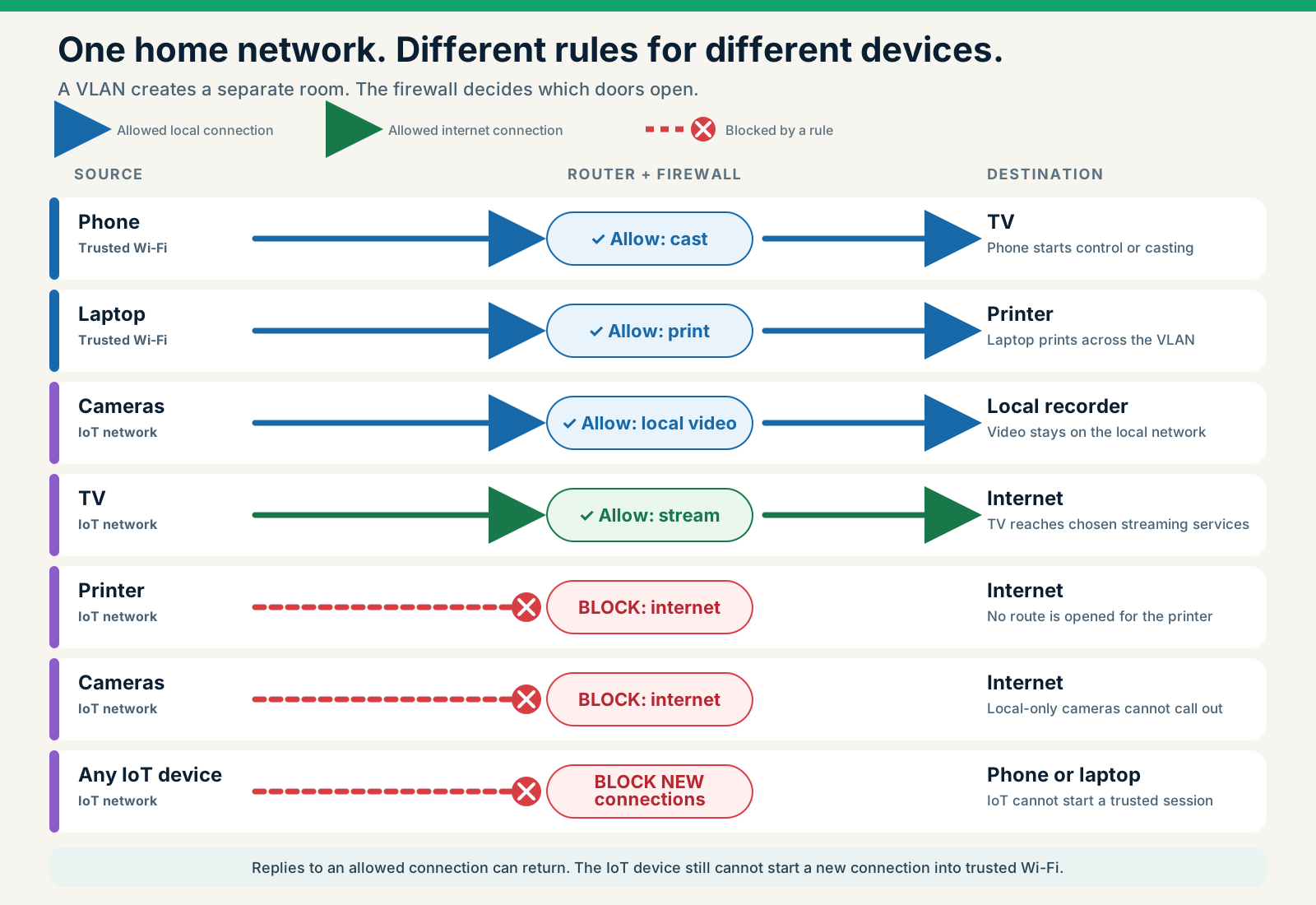
A VLAN is a separate room for a group of devices. It gives the television, cameras and other smart devices their own network space. The firewall supplies the door rules: who may leave the room, who may enter it and which services may pass between rooms and out to the internet.
A separate IoT network keeps smart devices away from laptops, storage and the router dashboard only when firewall rules enforce the boundary. The VLAN label on its own is not the control. On current supported versions, UniFi's zone-based firewall can group VLANs and apply rules between trusted, untrusted, VPN and external zones (Ubiquiti zone-based firewall guide).
Local separation and internet filtering are separate decisions. An IoT VLAN may stop a camera reaching a laptop while still allowing the camera unrestricted internet access. To limit "phone home" traffic you must add an explicit domain or internet-access rule as well.
Change the rules and see what happens
4. The visitor log: flow and security records
A block without a review process is only half a control. UniFi traffic flows can show sources, destinations, allowed and blocked activity, risk and the policy applied, on supported hardware and software (Ubiquiti traffic-flow documentation).
Repeated attempts from an idle device deserve attention. They may point to a stale application, a misconfiguration, unwanted telemetry or a compromise. A domain name alone does not tell you which of those it is.
Why one crossed-out address can matter
Domain blocking is cheap compared with many security projects. It is central, quick to reverse and it covers devices that cannot run a security agent. It can interrupt two different stages of an attack:
- reaching a known-malicious site during the initial compromise; and
- resolving a known command-and-control destination after compromise.
It earns the phrase first line of defence because it creates an early decision point. It should never be presented as the only line.
Protective DNS depends on current threat intelligence and on the device actually using the approved DNS service. ASD warns that it cannot cover direct-IP connections or name lookups that bypass the gateway, including some third-party encrypted DNS and devices used off the network. A compromised device may also talk through a legitimate cloud platform that cannot be blocked without breaking wanted services.
The promise is narrow: stop known, unnecessary destinations where the gateway has enough information to act.
How to set it up without taking the house offline
I make one change at a time and test after each one. The order below is the order I use.
1. Check what you already own
Record the gateway model, the UniFi OS and Network versions, current routing performance, your internet speed and installed storage. Confirm that the filtering, flow-log and IPS features you want are supported on that model. Export a configuration backup and write down how you would roll back.
Do not buy a CyberSecure subscription until your model, region and account show the feature as available.
2. Write down what must keep working
Group devices by trust and job: staff, household, servers, management, guests, cameras and IoT. Record what each smart device genuinely needs: DNS, time, updates, streaming, notifications, the vendor's cloud or local Home Assistant control.
Capture a short baseline before blocking anything. Test work login, banking, voice and video calls, streaming, casting, printing, software updates and the smart-home functions you rely on.
3. Put smart devices in their own room
Put smart devices in a dedicated VLAN or an isolated guest network. Block new connections from that zone to trusted devices and to the router dashboard. Add only the narrow local exceptions needed for a controller, recorder, printer or discovery service. Mirror the same policy for IPv6.
The full design, with the rules spelled out, is in How to put smart TVs and IoT devices on their own network.
4. Start with a small, sensible blocklist
In current UniFi documentation, content filters live under Settings → CyberSecure → Content Filter. Apply the malicious-domain policy to a test network or a single client first. Add a small custom blocklist only when each entry has a reason, a source, an owner and a review date.
Do not assume UniFi imports Pi-hole-style community subscription lists. The official page documents individual allow and block entries, not a general third-party list subscription feature.
5. Choose one DNS address book
UniFi's built-in filtering is simple and sits right at the gateway. Pi-hole offers richer DNS visibility, client grouping and maintained-list flexibility. They can live on the same network, but they should not be stacked without a plan.
Ubiquiti says content filtering redirects DNS to the gateway, and warns that internal or manually configured DNS can fail unless forwarding is handled explicitly. Pick a primary design, document the DNS path, and test local names, Active Directory where relevant, IPv4, IPv6 and what happens during an outage.
Start with What is Pi-hole; Pi-hole and Unbound covers running your own resolver.
6. Choose alarm-only or alarm-and-stop
Start with the threat categories that suit the network. Notify-only IDS gives you a baseline before blocking, but it does not stop the match. IPS adds automatic blocking, so it needs a process for false positives, exceptions and investigation.
After enabling inspection, check real internet throughput and latency. More signatures do not help if the gateway cannot carry the traffic reliably.
7. Decide which devices really need the internet
For a local printer, camera or automation device that does not need its vendor's cloud, block internet access and allow only the local destinations it needs. For a cloud-dependent device, start from observed and documented requirements, then narrow access cautiously.
Do not fix breakage with a permanent "allow anything" rule. Record each exception and why it exists.
8. Check the escape routes
Check Android Private DNS, Apple's privacy relay features, encrypted DNS in the browser (DoH and DoT), client VPNs, proxies and direct-IP traffic. Ubiquiti lists encrypted DNS, VPNs and proxies among the conditions that can defeat its DNS-based ad blocking (Ubiquiti gateway ad blocking).
Blocking all encrypted DNS is not automatically right. It can strip a useful privacy protection from managed devices. Decide whether the network needs central security visibility, an approved encrypted DNS service, a device policy or a documented exception.
9. Treat the logs like private records
Flow and DNS history can reveal work systems, health services and daily routines. Set a purpose and a retention period, restrict who can administer the gateway, use strong authentication and include the configuration in your recovery plan.
Be clear about cloud dependence. Ubiquiti says selected IDS/IPS detection metadata (timestamps, addresses, ports, protocols and signatures) temporarily passes through an encrypted channel with its cloud and is then deleted. CyberSecure currently requires Remote Access for activation. Make that trade-off knowingly.
10. Test before you trust it
Use a non-critical test client and a temporary custom entry for a harmless domain you control or have chosen for the test. Confirm the gateway refuses to resolve it, names the correct client and records the correct policy. Remove the temporary entry once you have recorded the result.
Then test:
- IoT-to-trusted access is denied.
- Approved local control and return traffic still work.
- Required updates, calls, streaming and logins work.
- A documented IDS/IPS test produces the expected alert or block.
- IPv4 and IPv6 follow the intended policy.
- The network recovers after a gateway restart.
- The person responsible for recovery can find the saved configuration.
What you gain
- known-malicious and unwanted domains made visible, and blockable, on the controlled DNS path
- known suspicious traffic patterns covered by the IPS signatures you enable
- fewer paths for an isolated guest or IoT device to reach trusted systems
- no unnecessary internet access from devices that work locally
- visibility into which client attempted a blocked connection
- one consistent policy across devices that cannot run security software
What it still cannot stop
A UniFi gateway does not disinfect a device, patch an appliance, protect a stolen password, make every cloud service trustworthy or guarantee that every attack is detected.
DNS filtering cannot see every direct-IP, VPN, proxy, mobile-data or bypassed encrypted-DNS connection. IPS can miss unknown or disguised behaviour. Strict internet-access rules can break updates, casting, notifications and remote access. An allowed domain can host both legitimate and malicious content.
Keep endpoint protection, prompt patching, multi-factor authentication, least privilege, backups and an incident plan. The gateway is a strong layer because it sees the shared traffic, not because it replaces the rest of your security.
What you need to look after
Review the alerts and the false positives, not just the green dashboard. Update gateway software and threat intelligence, confirm throughput after major changes, remove obsolete exceptions, review your custom domains. Add and retire devices properly, protect the logs, and re-run the boundary and recovery tests after significant updates.
Record a source, an owner and a review date for every blocklist entry, and keep a one-line reason beside every firewall rule.
When Alien IT can help
We can assess whether a network is better served by UniFi's built-in filtering, a Pi-hole, or a combined design. A managed scope can include gateway selection, VLANs, DNS policy, IPS and CyberSecure configuration, outbound rules, testing, documentation and an agreed maintenance boundary. If you want a UniFi gateway installed and configured, see our UniFi installation service.
It is our first recommendation where the hardware and the maintenance arrangement fit, and we say so when they do not. The recommendation may be simple: enable the existing gateway's basic protections and isolate IoT. It may be stricter: deny internet access for selected devices and allow only proven requirements. It may also be that the existing hardware should stay as it is, because the migration cost or the ongoing burden is not justified. If you would rather have the filtering layer as a product, see the Alien Privacy Box.
Want this done properly on your own network? Alien IT can assess your gateway, set the rules, test them and write down the rollback. Call 02 9707 0999 or use the contact page.
Frequently asked questions
Is CyberSecure required for UniFi security?
No. Ubiquiti documents built-in gateway filtering and IDS/IPS without it. CyberSecure is an optional per-site subscription that expands the threat signatures and adds enhanced content filtering. Exact capability depends on the gateway model and software.
Will a domain blocklist stop malware phoning home?
It can stop malware resolving a known, listed "phone home" domain. It will not stop a direct-IP connection, an unknown domain, a permitted cloud service, a VPN or a DNS bypass, and it does not remove the malware from the device.
Is a UniFi IoT VLAN enough?
No. Isolation protects your trusted local systems. Internet access is a separate decision. Add DNS filtering or explicit internet-access rules if you also want to reduce telemetry or malware "phone home" paths.
Does UniFi replace Pi-hole?
It can, for a household or small business that wants simpler filtering at the gateway. Pi-hole remains useful when detailed DNS visibility, custom client groups or maintained-list flexibility matter. Choose based on who will maintain it, not brand loyalty.
Should I block every unknown destination?
Not without a test and a recovery plan. Blocking every internet destination except an approved few is powerful for predictable devices, but it can break important services. Start with evidence, then narrow access.
Does CyberSecure keep all processing local?
No. Ubiquiti documents cloud-powered enhanced filtering, a Remote Access requirement to activate the subscription and a temporary encrypted cloud path for selected detection metadata.